TL;DR
Three ideas before you begin
- Search broadly for patterns, then narrowly to test a hypothesis
- Save evidence and landing pages, not just attractive images
- Extract structures without copying competitor creative
Before you start
Prepare the inputs
- Choose the product category, target country, and ad platform
- Prepare brand, category, and pain-point keyword groups
- Define the creative hypothesis to test
Step 1
From “Write a clear research question” to “Create consistent capture fields”
To produce “A competitor creative board organized by market, platform, and creative pattern”, make “Write a clear research question” and “Create consistent capture fields” a reviewable starting point. Every later filter and judgment should preserve this scope.
- 1.1
Write a clear research question
For example, “Which opening patterns appear in high-engagement US skincare ads from the last 30 days?” and state what is out of scope.
- 1.2
Create consistent capture fields
Capture platform, country, first and last seen dates, engagement, proposition, visual structure, call to action, and landing page.
Before searching, you have a hypothesis, keyword groups, and an empty observation sheet.
Step 2
“Use broad filters to find repeated patterns”, then “Cross-check with keywords and platforms”
Keep only the evidence needed for “Use broad filters to find repeated patterns” and “Cross-check with keywords and platforms”. Record why each filter changes so the result remains reproducible instead of becoming an unexplained screenshot.
- 2.1
Use broad filters to find repeated patterns
Start with category and market to collect enough examples, observe repeated propositions, formats, and run duration, then refine.
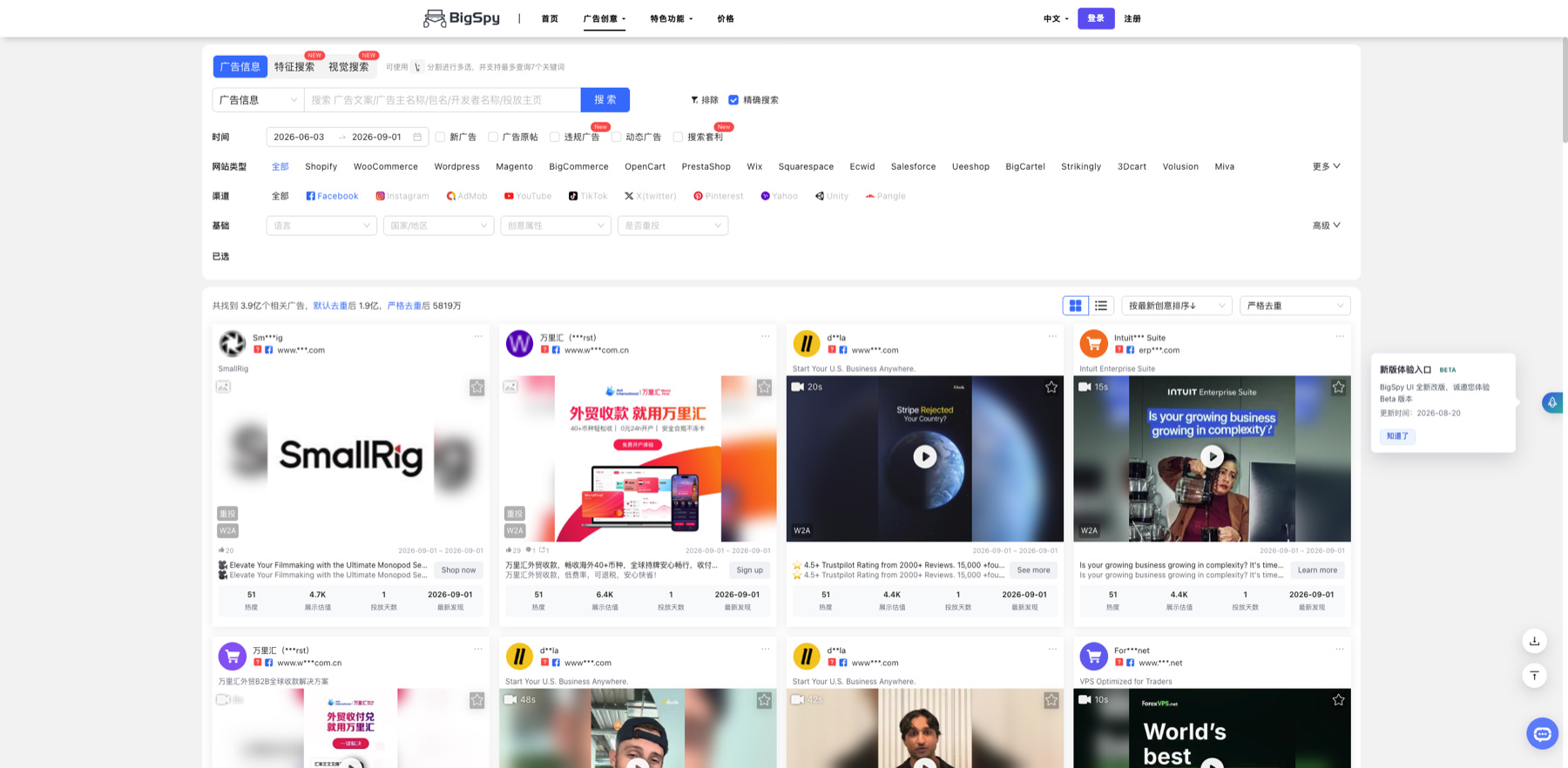
Keep a reproducible path from filters to result cards. Markers- 1 Keyword input
- 2 Date range
- 3 Market and base filters
- 4 Ad result cards
Narrow filters according to the research question. Result cards reveal repeated patterns, but engagement and run duration do not prove conversion and are not permission to copy creative.
Verify source: BigSpy official ad search interface - 2.2
Cross-check with keywords and platforms
Run brand, category, and pain-point terms separately and compare how one concept is adapted across platforms.
The board contains at least three creative patterns supported by multiple examples.
Step 3
“Check landing pages and run duration” and “Turn findings into an original test brief”
Do not stop at tool output. Use “Check landing pages and run duration” and “Turn findings into an original test brief” to verify quality, limitations, and ownership so “A competitor creative board organized by market, platform, and creative pattern” becomes actionable.
- 3.1
Check landing pages and run duration
High engagement does not equal conversion. Inspect the landing page, offer, comment context, and run duration to reduce false conclusions.
- 3.2
Turn findings into an original test brief
Keep the problem–promise–proof–action structure, create original copy and visuals, and define one measurable test variable.
Every test idea names its evidence source, original adaptation, and success metric.
WHO · HOW · WHY
How this guide was written and reviewed
- Who
- Independently written and manually reviewed by the RelayX Editorial Team, with update and capture dates shown on the page.
- How
- Treat tool output as candidate evidence, not proof of sales or conversion. Recheck every conclusion against run duration, landing pages, product cost, inventory, and target-market rules.
- Why
- The goal is not to restate product features but to help you produce “A competitor creative board organized by market, platform, and creative pattern”. The workflow is organized around that outcome with checkpoints, limitations, and next actions.
Interface captures come from official accessible product pages or the current browser interface. Each appears under its matching step with numbered controls and data points. When real functional UI cannot be publicly verified, the guide says so instead of using a marketing homepage as filler. No third-party tutorial text or imagery is reused; third-party brands and interface rights remain with their respective owners.