TL;DR
Three ideas before you begin
- Prioritize domains that link to multiple competitors
- Pair automated metrics with manual relevance review
- Segment by partnership reason instead of mass-sending one template
Before you start
Prepare the inputs
- Prepare your domain and three to five content-comparable competitors
- Define the page or topic you want to promote
- Prepare a sheet for source pages, contacts, and status
Step 1
Choose competitors suitable for link comparison
Business competitors are not always the best link competitors. Choose sites with comparable topics, audiences, and page types.
- 1.1
Separate business and content competitors
Keep direct business competitors, then add publishers, tool sites, or content brands that consistently earn links in the target topic.
- 1.2
Exclude incomparable giant domains
Observe encyclopedias, social platforms, and major publishers separately so they do not overwhelm reachable niche opportunities.
- 1.3
Record the target page type
Specify whether you are promoting research, a tool page, a guide, or a resource page, then compare pages with similar linking reasons.
Every competitor should have a one-sentence reason explaining why it belongs in the link comparison.
Step 2
Extract the gap and narrow the set
Start with intersections for stronger shared signals, then add quality and topic filters.
- 2.1
Run a domain-level gap
Enter your domain and competitors, then filter for referring domains linking to at least two competitors but not you.
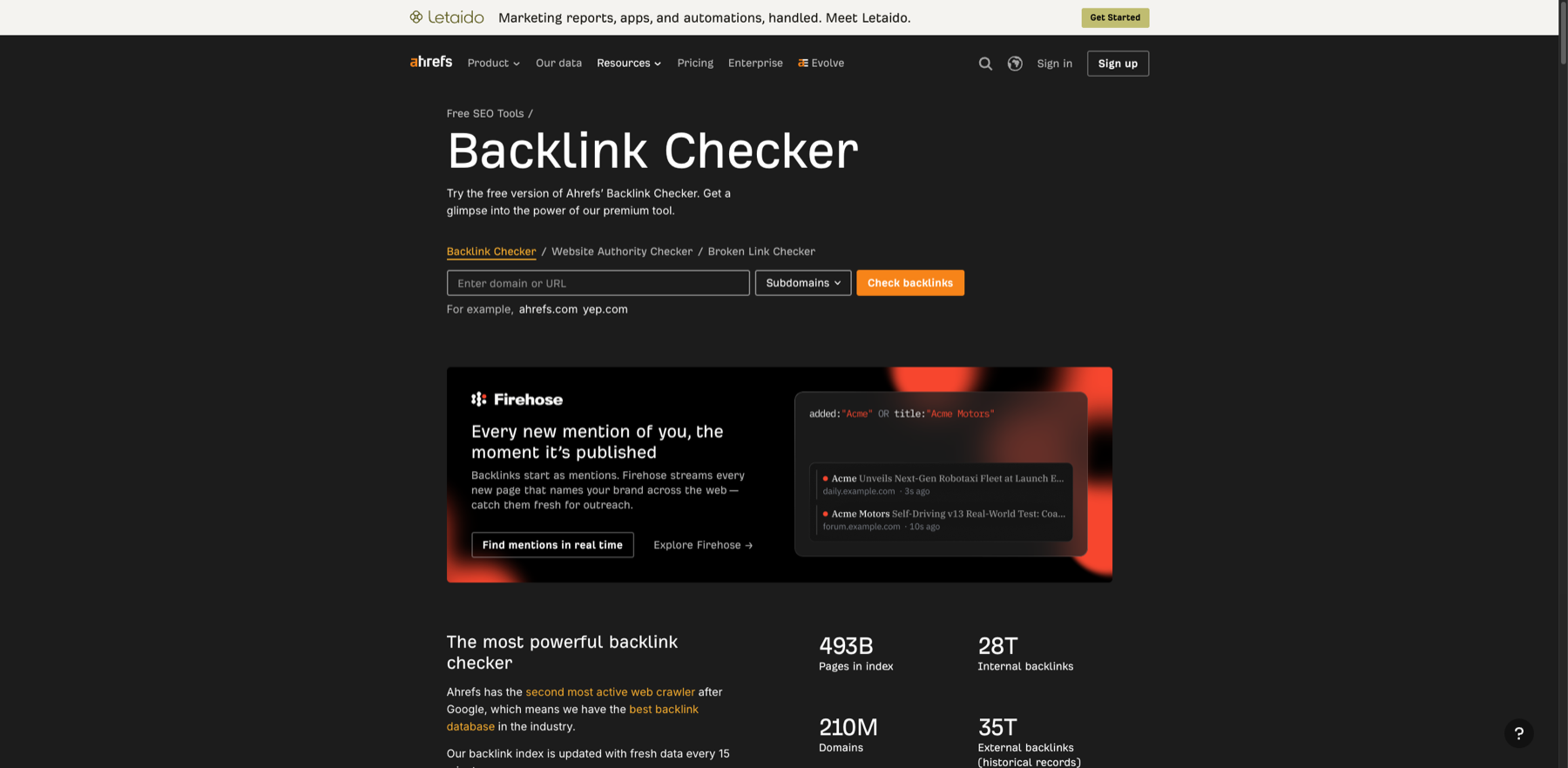
Normalize every competitor domain mode before running a domain-level gap. Markers- 1 Target domain or URL
- 2 Domain mode
- 3 Run check
Choose the whole domain, subdomain, or exact URL before querying. This is the free checker entry; a formal backlink gap still requires a supported Link Intersect or gap report.
Verify source: Ahrefs official Backlink Checker - 2.2
Keep the exact source pages
Do not export root domains alone. Save the exact source page, anchor, destination, and first-seen date to understand the context.
- 2.3
Pre-filter by topic and language
Remove results clearly unrelated to the target market, language, or topic before the more expensive manual review.
Reduce the initial output to a candidate set small enough for page-by-page review.
Step 3
Manually verify relevance and attainability
Authority metrics cannot explain why a site would link to you; that requires page-level context.
- 3.1
Open the source page and verify the link
Check that the page is accessible and maintained, whether the link sits in the body, and why the competitor was referenced.
- 3.2
Assess business relevance
Score audience overlap, topical fit, geography/language, and page quality from zero to two.
- 3.3
Flag risk and unreachable prospects
Exclude obvious link networks, expired pages, low-quality sites, and sources with no credible collaboration path.
Every retained domain should have a relevance score, link context, and at least one credible partnership reason.
Step 4
Segment, find contacts, and design outreach
Segment prospects by why they may link so outreach can be specific.
- 4.1
Segment by opportunity type
Common groups include resource additions, data citations, content updates, expert input, tool listings, and co-created content.
- 4.2
Find the most relevant contact
Prioritize the author, section editor, or partnerships owner, recording the source and verification date without collecting irrelevant personal data.
- 4.3
State a specific value exchange
Mention the page reviewed, what you can add, and why readers benefit. Do not fabricate relationships or offer undisclosed incentives.
Every high-priority prospect should have a contact, partnership reason, personalization evidence, and next follow-up date.
Step 5
Track outcomes and refresh priorities
An outreach list is a learning dataset, not a sheet that ends after one send.
- 5.1
Track process metrics
Track delivery, replies, positive replies, confirmed collaborations, live links, and rejection reasons.
- 5.2
Compare performance by segment
Identify which partnership reasons and source-page types perform best instead of relying on overall reply rate.
- 5.3
Refresh the gap monthly
Add new sources, remove dead pages, and feed successful patterns back into content and digital PR planning.
Your list should explain what worked, why it worked, and how the next round will be more focused.
WHO · HOW · WHY
How this guide was written and reviewed
- Who
- Independently written and manually reviewed by the RelayX Editorial Team, with update and capture dates shown on the page.
- How
- Fix geography, time, device, and domain scope first, then cross-check third-party estimates with owned analytics, search-console data, or public pages. No single traffic or authority score is treated as a business result.
- Why
- The goal is not to restate product features but to help you produce “A verified, segmented outreach list with clear ownership”. The workflow is organized around that outcome with checkpoints, limitations, and next actions.
Interface captures come from official accessible product pages or the current browser interface. Each appears under its matching step with numbered controls and data points. When real functional UI cannot be publicly verified, the guide says so instead of using a marketing homepage as filler. No third-party tutorial text or imagery is reused; third-party brands and interface rights remain with their respective owners.